
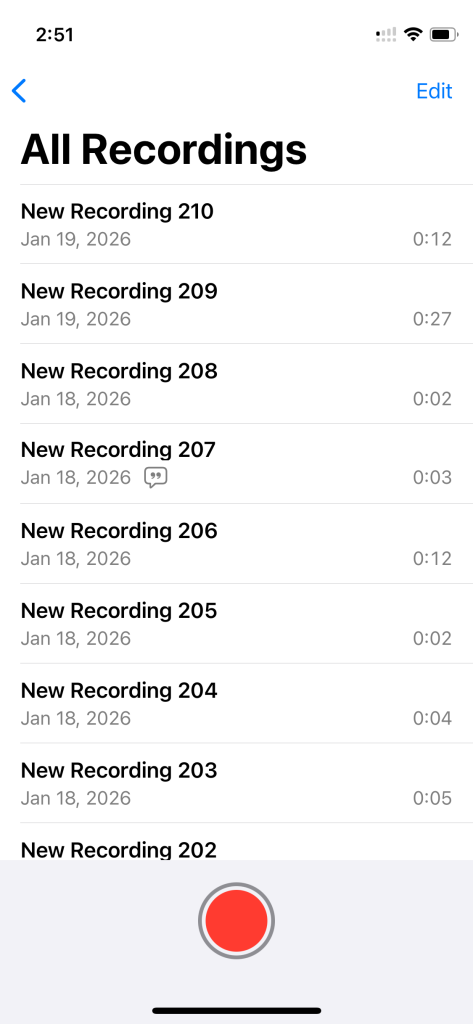
You open Voice Memos. You see “New Recording 247.” No clue what it is. Could be a hook you freestyled at a red light two months ago. Could be a random voice note. When you tap play, what will you hear?
I’ve been there. I had over 300 voice memos at one point, all nameless, contextless, useless. My lyrics were scattered across two apps and multiple notebooks. The melody lived in one place. The words lived somewhere else. And the connection between them? As invisible as fishing wire.
That’s why I built Spit Notes. But before I talk about any tool, let me walk you through the system. Because a system is what actually saves your ideas. Here are the five steps I use to never lose a song idea again.
How Song Ideas Slip Away
Nobody sits down and decides to lose a song idea. It just happens. You freestyle something at a red light and by the time you park, the rhythm’s already fading. You wake up at 2am with a melody in your head, mumble it into your phone, and in the morning it’s just another untitled recording you’ll never play back.
The ideas don’t vanish all at once. They erode. Little bits and pieces like a cadence, a turn of phrase, the way a verse was supposed to sit on a beat, it all gets buried under the noise of daily life. You remember you had something good. You just can’t remember what it was or why it felt right.
The reason is because the default tools most songwriters use force you to split your creative work across apps. Lyrics go in the Notes app. Melodies go in Voice Memos. Chord progressions end up somewhere else. Nothing is connected, so the context around an idea — the feel, the intent, which lyric went with which melody — fades.
Songwriter Ramita Arora nails it on Write the Next Song — Voice Memos is great until you’ve got hundreds of unlabeled recordings and you can’t be bothered to dig through them all. She’s right. The app works fine. The problem is what happens three weeks later when you’re trying to find that one thing you recorded.
Multi-number-one hit songwriter Marty Dodson puts it bluntly on Songtown: if you can’t find your ideas, they don’t exist. That’s the real cost. Not that the ideas are gone forever — but that they’re buried so deep they might as well be.
Step 1: Capture Ideas the Second They Hit
Your capture system needs to be faster than the time it takes for an idea to fade. If you have to unlock your phone, open an app, find a folder, and then hit record, you’ve already lost half the melody.
One-tap recording is the baseline. Whatever you use, it should go from pocket to recording in under three seconds. No menus. No decisions. No friction.
And when you record, don’t shy away from adding context out loud. Future you will be grateful. Caleb J. Murphy over on Sonicbids recommends stating the chord progression in the recording itself — especially useful if you play alternate tunings or unusual voicings.
Here’s the part most guides skip: write the lyric fragment immediately, in the same place as the recording. Don’t make yourself choose between recording audio or writing text. Do both. Same place.
Think about where ideas actually hit you. In the shower. At a red light. Walking the dog. 2am when you should be sleeping. Your system has to work in all of those situations, from your phone, with almost no steps. If capturing an idea takes discipline and effort, the system’s already broken. It has to be automatic.
The fastest capture happens when audio and lyrics go into the same note — one tap, and you’re recording and writing together. That’s the principle.
Step 2: Stop Titling Voice Memos by Hand
Let’s be real. Nobody wants to stop mid-creative-flow to type out a descriptive file name. You just recorded something. The last thing you want to do is switch into librarian mode and catalog it. And when you only have a seed of a song, the title serves as a useful reference. By the time you complete the song you’ll likely have a finalized title in mind.
That’s why most voice memos end up untitled. It’s not laziness — it’s that naming files is a completely different headspace than making music. And every guide out there tells you to “name and tag everything immediately” like you’re filing expense reports. You’re not an accountant. You’re writing songs.
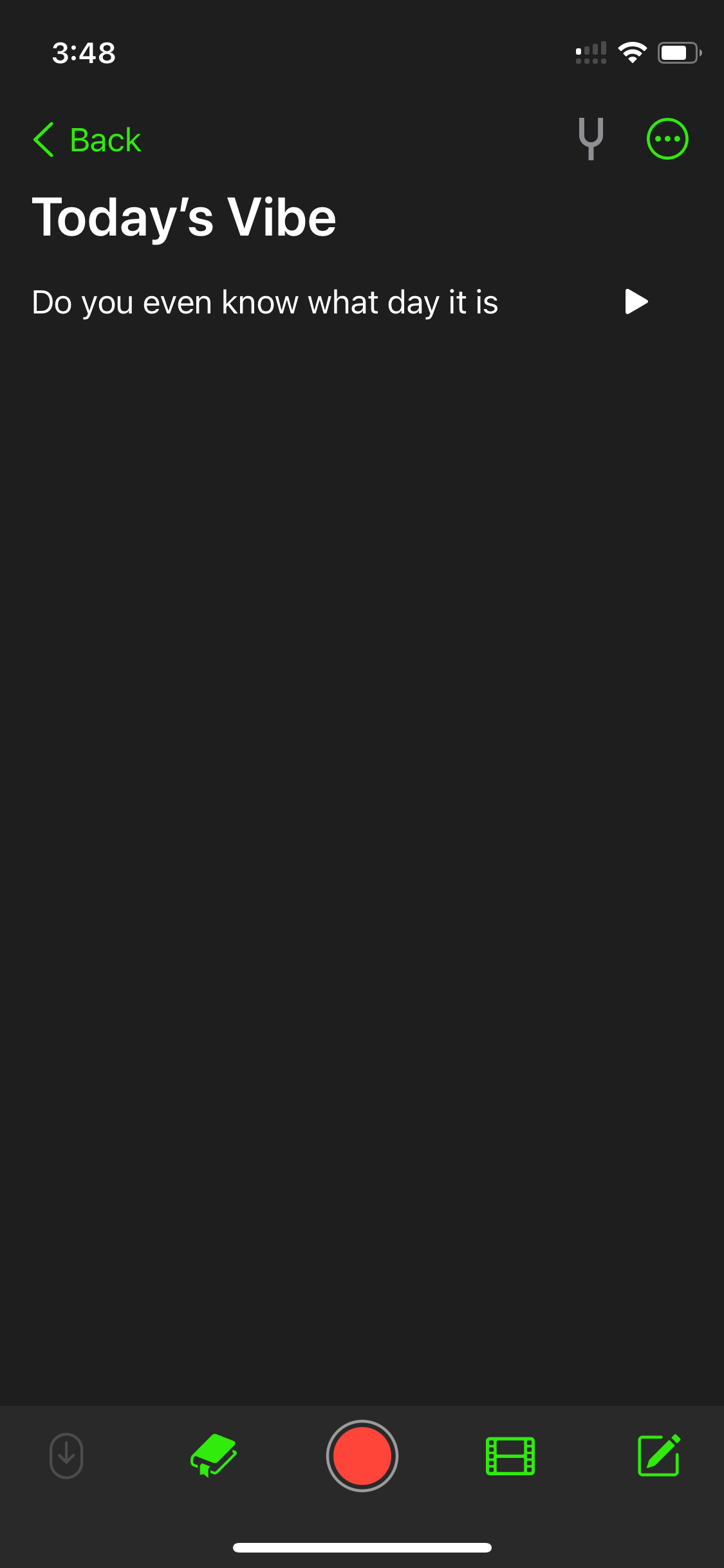
But the title still matters. An untitled voice memo is basically invisible. You’ll never find it again. The trick is making the title happen without you having to think about it.
Spit Notes handles this with a small AI model that automatically titles your notes when you make a quick recording. You tap record, capture your idea, and the note gets a real name, not “New Recording 247.” No extra steps, no context switching, no breaking your creative flow to do administrative work.
That’s the whole point. The difference between a song spark that gets developed into something and one that disappears isn’t a complex tagging system or a color-coded folder structure. It’s whether the idea ends up in a titled, findable note or an untitled voice memo that gets buried under 50 more untitled voice memos.
Some people treat organizing as a substitute for actually creating. It feels productive — setting up databases, building tag systems, sorting things into nested folders. But that’s procrastination with a productivity label on it. The goal is to spend your time writing, not filing. Get the title handled automatically and move on to the next idea.
Step 3: Keep Your Lyrics and Audio Together
This is the step that changes everything. And honestly, it’s the one no other songwriting guide talks about.
Most songwriters keep lyrics in one app and recordings in another. The Notes app holds the words. Voice Memos holds the melody. Maybe Google Docs has some older drafts floating around. And the connection between a lyric and its matching recording? That lives in your memory. Only in your memory.
Two weeks later, you’re scrolling through Voice Memos trying to match “New Recording 89” to a verse fragment in Notes. You play three recordings. None of them sound right. You give up and start something new.
That’s the fragmentation trap. And it’s the single biggest reason song ideas stall out.
The fix is simple: every song idea should live as a single unit that contains both the written lyrics and references or snippets of audio recording. One note. Both together.
Before (the fragmented workflow): Record a melody in Voice Memos. Switch to Notes to write the lyrics. Come back later. Forget which recording goes with which lyric. Waste 15 minutes searching. Give up.
After (the unified workflow): Open one note. Tap record. Capture the melody. Write the lyrics right underneath. Search by lyric text to find the exact recording. Pick up where you left off in seconds.
Now, some apps claim to solve this. Evernote lets you attach audio files to a note, and the iOS Notes app does too. But attaching an audio file to a note isn’t really keeping lyrics and audio together — it’s more like attaching an MP3 to an email. The audio sits there as a file you can tap to play, but it doesn’t fit naturally into a writing workspace. You’re not looking at your lyrics and hearing the recording in context. It’s just a file bolted onto a text note.
Spit Notes was built to solve this differently. Your voice recordings and lyrics live together in the same note — not as attachments, but as part of the same workspace. Tap record, capture the melody, write the lyrics right alongside it. Everything flows together because the app was designed around how songwriters actually work, not how office workers organize memos.
The method matters more than the specific tool. But using a tool that was designed for the workflow makes the method effortless.
Step 4: Keep Everything in One Place
This sounds obvious, but almost nobody actually does it. Most songwriters have lyrics scattered across different apps and notebooks, and maybe some older stuff in a Notion doc or an email thread they sent to themselves.
The fix is picking one place as the source of truth and putting everything there. When all of your song ideas and lyrics live in one app that is digitized, searchable, and backed up — everything changes. You don’t need to remember which app you used three months ago. You don’t need to dig through iCloud, your email, or a Notes folder you forgot existed. You search, and it’s there.
Nashville songwriter Sarah Spencer describes her system on SongFancy: organize by catalog, then by co-writer, then by song title. That works for her. Some rappers organize by project — album, mixtape, loosies. The specifics don’t matter as much as the principle: one place, everything in it.
Quick note on digital vs. analog: some writers swear by physical notebooks for lyrics, and that’s fine for drafting. But audio needs digital tools, and notebooks can’t be searched. A lyric notebook is great until you spill coffee on it. Whatever you jot down on paper, make sure a digital version exists somewhere you can find it. It’s impossible to find long lost lyrics in old physical notebooks without spending hours reading through them page by page.
The real power of having everything in one place is search. When your entire catalog of ideas is digitized and indexed, finding something specific takes seconds. You don’t have to scroll through everything manually. You type a word or a phrase and the matching notes come up. This makes sure your past work is actually available to you when you need it.
Step 5: Rediscover What You’ve Already Written
Here’s another thing most songwriting guides miss entirely: the value of your idea bank isn’t just storage. It’s rediscovery.
Every songwriter has written lines they’ve forgotten about. Verses that didn’t fit a song at the time but would be perfect for something new. A rhyme you came up with six months ago that’s exactly what you need right now. If your old work is buried in untitled voice memos or scattered across apps, you’ll never find it. You’ll just write something new from scratch every time, not realizing you already had the piece you were looking for.
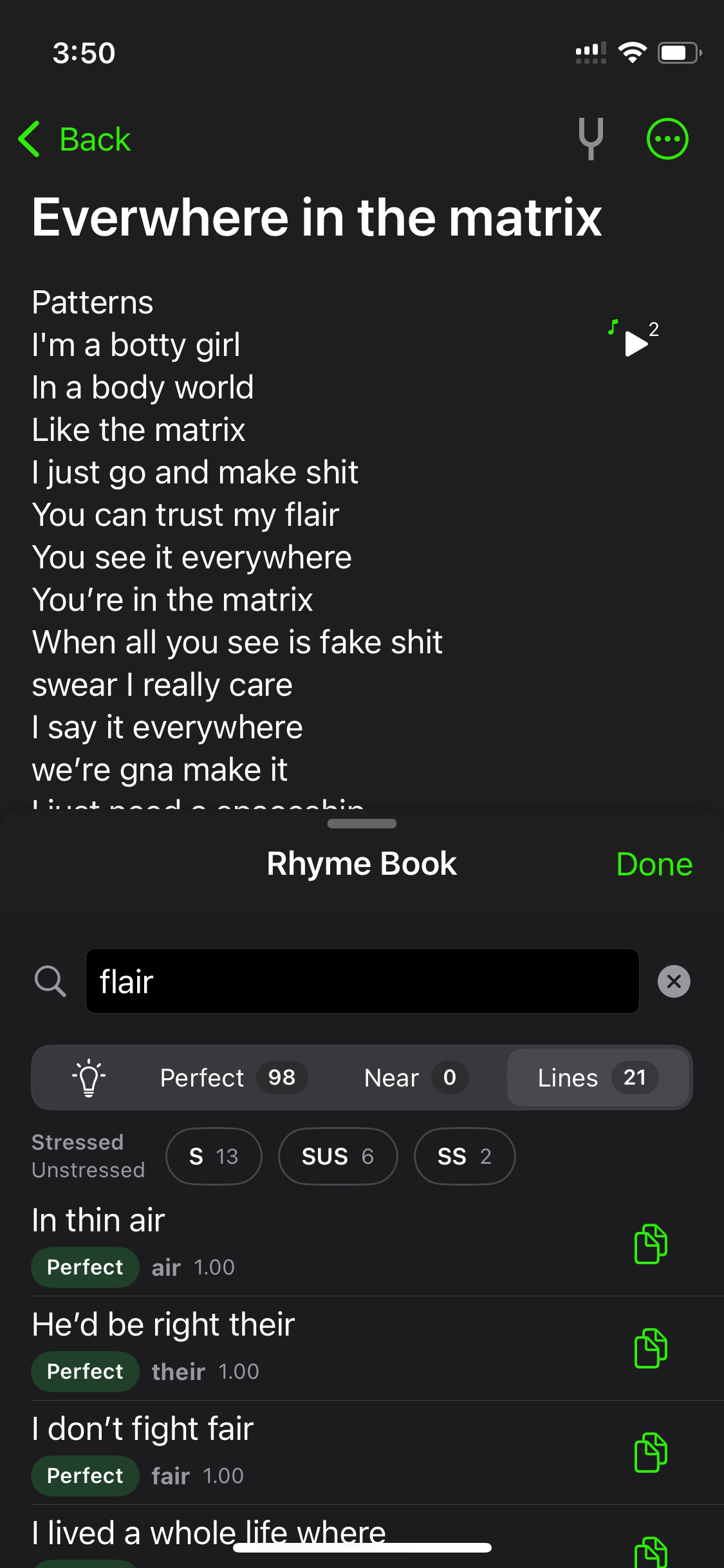
This is where having everything digitized and searchable pays off in a way most people don’t expect. With Spit Notes, there’s a feature called rhyme search that looks through all of your notes and surfaces past lines that end with a word that rhymes with whatever you’re working on right now. So you’re writing a verse, you’re stuck on a line, and instead of just pulling from a generic rhyme dictionary, you can pull from your own writing — lines you already wrote that rhyme with your current word.
The rhyme search is also built into the rhyme dictionary itself. When you open the dictionary while working on a line, there’s a Lines tab you can tap to see your own past lines that rhyme with the current word. It’s your personal catalog, searchable by rhyme, built right into the writing tool.
Marty Dodson tells a story on Songtown about co-writing with Jim Collins. Collins said, “Let’s write something with a reggae feel, maybe for Kenny Chesney.” Dodson searched his idea database and pulled up a title he’d saved: “Everybody Wants to Go to Heaven.” That song became a number-one hit. It happened because Dodson could search his past work and find exactly the right starting point in seconds.
You don’t need to schedule weekly review sessions or treat your idea bank like a diary you reread. You just need everything in one searchable place so that when the moment comes, either in a co-write, in a session, or at 2am, you can find what you need.
Tools for Organizing Songwriting Ideas in 2026
The system matters more than any individual tool. But the right tool removes friction. Here’s what works right now, with honest takes on each.
Spit Notes (iOS) — Purpose-built for songwriters who want lyrics and audio in one note, not as attachments but as part of the same writing workspace. One-tap recording, AI auto-titling, search, rhyme search across your own lyrics, a rhyme dictionary, rhyme highlighting, and transcription. $1.99 lifetime for unlimited notes. Best for mobile-first rappers and singer-songwriters who capture ideas on the go and need audio and lyrics together in one place.
Evernote — General-purpose notes app. You can attach audio files to notes, create notebooks for projects, and sync across devices. The audio attachment approach works more like adding a file to an email than writing alongside a recording, so it’s better for general note-taking than active songwriting. Free tier is limited to 50 notes and one device; paid starts at $14.99/month.
Notion / Google Docs — Flexible text-based organization. Notion is strong for database-style setups with filters and views. Google Docs is simple and easy to share. Neither handles audio in a way that’s useful for songwriting. Best for lyrics-heavy writers who work primarily in text.
Voice Memos + Notes app — The default iOS combo. Free, always there, already on your phone. The problem: attaching audio to notes is clunky, obtrusive, and tedious. So audio lives in one app, words live in another. Works if you’re disciplined about naming every recording and cross-referencing manually. Most people aren’t.
Airtable — Spreadsheet-style database for tracking titles and ideas. This is the Marty Dodson method: columns for title, notes, keywords, target artist, and genre. Best for prolific writers with hundreds of ideas who want powerful search and filtering. Not a writing tool — more of a catalog.
| Tool | Audio + Lyrics Together | Search | Cost | Best For |
|---|---|---|---|---|
| Spit Notes | Yes, native workspace | Yes + rhyme search | $1.99 lifetime | Mobile-first songwriters |
| Evernote | Audio as attachment | Yes | Free (limited) / $14.99+/mo | General note-takers |
| Notion | No native audio | Yes | Free / Paid tiers | Lyrics-heavy, database fans |
| Voice Memos + Notes | No (separate apps) | Limited | Free | Minimal needs, disciplined namers |
| Airtable | No | Yes (advanced) | Free / Paid tiers | Prolific title trackers |
Frequently Asked Questions
For a unified lyrics-and-audio experience, Spit Notes keeps everything in one searchable note with one-tap recording and AI auto-titling. For text-only organization, Notion works well. Apple’s built-in Voice Memos and Notes apps are free but keep audio and text in separate apps which is the fragmentation problem most songwriters run into.
Most pros use a searchable system for titles and ideas. Marty Dodson uses Airtable with columns for title, keywords, and target artist. They make sure every idea gets a name and is findable, and they use tools like Session Studio or Disco for demo sharing. The common thread: nothing stays untitled, and everything lives somewhere searchable.
Both work for lyrics. But audio ideas need digital tools — there’s no way around that. The best approach is hybrid: jot lyrics wherever feels natural (notebook, phone, napkin), but always record audio digitally and keep it connected to the written lyrics. Paper alone can’t capture melody, delivery, or rhythm.
Some rappers use bar sheets which are structured documents that align syllables to beats within each bar. They’ll record flows over click tracks at a set BPM and keep a running “hook book” of ideas. Most rappers however are happy with just a blank page either in a notebook or their phone. The key is capturing not just the words but the rhythm and delivery alongside them.
Key Takeaways
- Song ideas don’t disappear all at once, instead they erode. The rhythm fades, the context gets lost, and an untitled voice memo becomes invisible.
- The fastest capture system doesn’t make you choose between recording audio and writing lyrics. Do both in the same place.
- Don’t waste creative energy titling files by hand. Let AI auto-title your notes so you can stay in the writing headspace.
- Keep lyrics and audio recordings together in the same workspace — not as attachments, but as part of the same note.
- Put everything in one searchable place so your past work is actually available to you when you need it.
- The power of organized lyrics is rediscovery — finding lines you’ve already written that fit what you’re working on right now.
- Purpose-built songwriting apps like Spit Notes solve the fragmentation problem that general tools create.
The voice memo graveyard is real. But you don’t have to stay there.
The system matters more than the tool. Capture fast, keep lyrics and audio together, put everything in one place, and make sure it’s searchable. Do those things and your song ideas stop slipping away.
Songwriting organization is moving toward AI-powered auto-titling, built-in rhyme search, and unified audio-text workspaces. The days of manually naming 300 voice memos are ending. The tools are finally catching up to how songwriters actually work.
Try Spit Notes free and see what it’s like when your lyrics and recordings live in one place.