

Every songwriter has a graveyard. It’s on your phone right now. Hundreds of voice memos named things like “New Recording 247” sitting next to a notes app full of half-finished verses that don’t connect to anything. You recorded the melody in one place and wrote the lyrics in another, and now you can’t remember which belongs to which.
That problem is why we built Spit Notes. And if you’ve been using it, you already know the relief of having your voice and your words in the same place.
But capturing ideas was just the start. The new update turns Spit Notes into something bigger — a songwriting workspace that helps you see what you’re hearing, pull apart your references, and stay in the pocket without leaving the app.
Here’s what’s new.
Chord Detection That Actually Helps You Write
You know when you stumble onto a chord progression that just feels right, but you can’t name what you’re playing? That used to mean stopping everything, opening a separate app, maybe Googling “what chord is this,” and losing your momentum.
Now you drop a recording into any note and Spit Notes figures out the chords for you. They show up right there, labeled and editable, so you can see the harmony behind what you’re hearing. And because you can edit them, if the detection gets one wrong — or you played something weird on purpose — you just fix it.
It’s not about music theory for its own sake. It’s about never forgetting what you played. Three weeks from now when you come back to that note, you won’t be squinting at a waveform trying to remember if the bridge was in E minor or D minor. It’ll be right there.
A Tuner Built Into Your Writing Space
This one’s simple but it matters more than you’d think. There’s a tuning fork icon in the app now. Tap it and you get a live pitch meter.
It works for guitar, obviously. But the thing that makes it different is the VOI mode — a specialized setting for voice. If you’re warming up before a session, or you want to check if you’re actually hitting that note you think you’re hitting, it’s right there. No separate tuner app. No clip-on tuner you left in the other room.
Small feature. Saves real time.
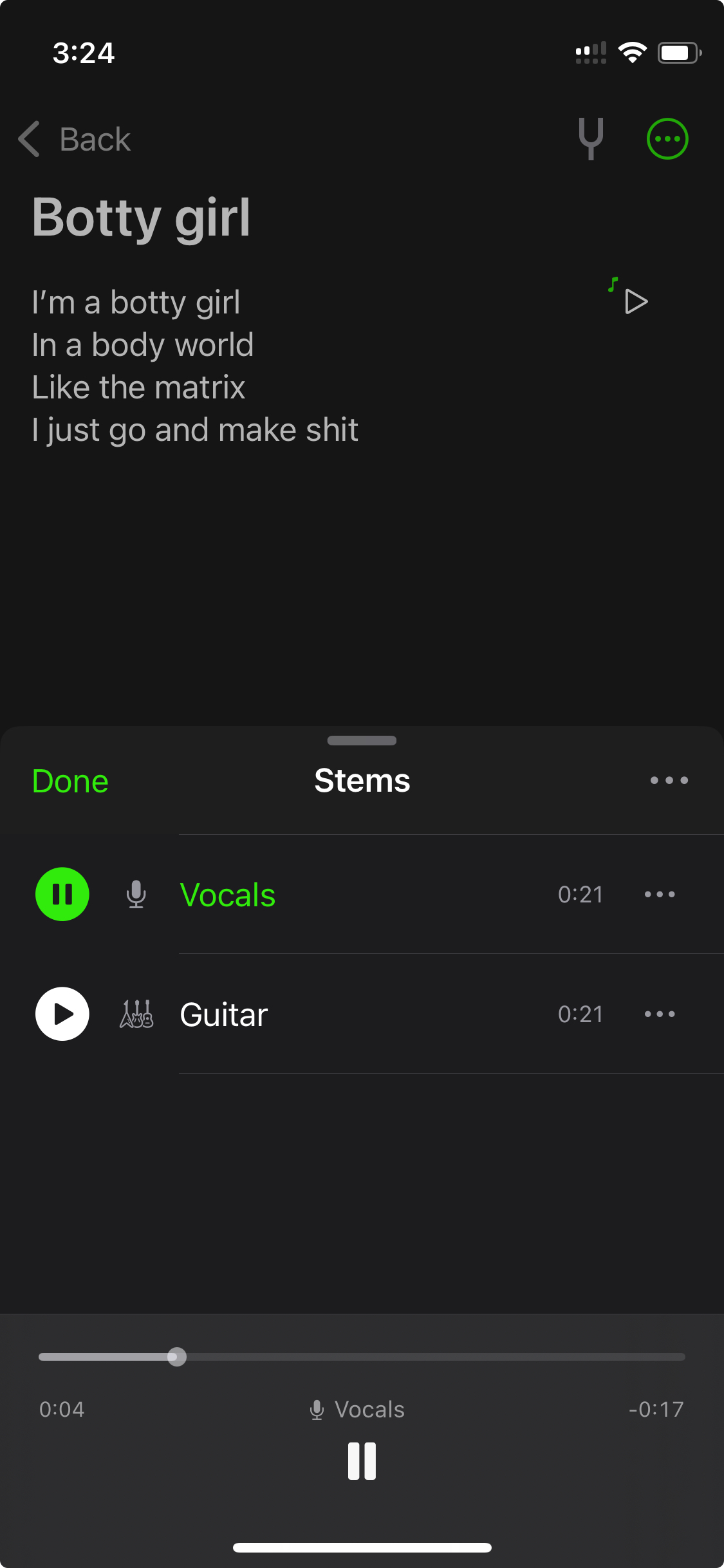
Stem Splitting: Take Songs Apart
This is the one that changes how you study music.
Tap the split audio button for a track and Spit Notes separates it into vocals and instruments, including guitar, drums, and bass. Clean stems, one tap. Why does this matter for songwriting? A few reasons.
Say you’re listening to a reference track and you love the vocal melody but the production is drowning it out. Strip it. Now you can hear exactly what the singer is doing and write something in that lane.
Or you found an old demo of yours where you were humming over a beat. Split the stems and listen to just your vocal. Maybe that melody is stronger than you remembered and it deserves real lyrics now.
Producers will use this differently. Sample a melody, isolate a drum pattern, strip a beat down to its bones. It’s the kind of tool that used to require a laptop and a separate app. Now it’s inside your notes, right next to your words.
Record From Your Lock Screen
Ideas don’t wait for you to unlock your phone, find the app, and tap through menus. That’s the whole reason Spit Notes exists — zero friction.
Now you can add Spit Notes to your Control Center. One swipe, one tap, you’re recording. Before you even open the app. The recording lands in your notes automatically when you’re done.
This is the feature that matches how ideas actually arrive: sudden, inconvenient, and gone in thirty seconds if you don’t catch them. Middle of a walk. Lying in bed at 2 a.m. Waiting in line somewhere. You don’t need to think about it. Just swipe and go.
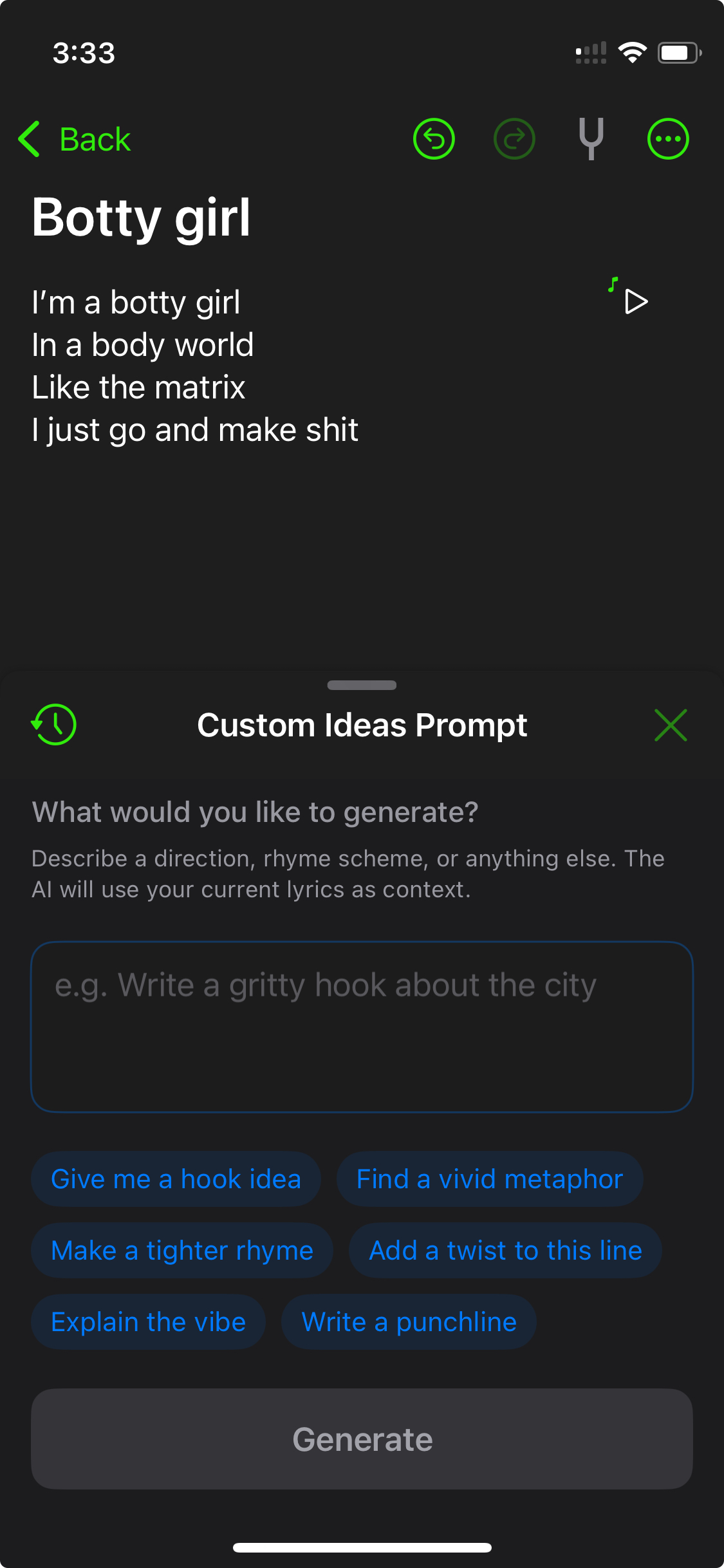
Custom Idea Prompts
The Ideas lightbulb has been in Spit Notes for a while. It reads what you’ve written so far and gives you context-aware sparks — words, rhymes, directions you might not have considered. It’s a nudge, not a ghostwriter.
But here’s what people kept asking for: “Can I tell it what I’m going for?”
Now you can. Long-press the lightbulb and type a custom prompt. Tell it you want something dark and introspective. Or ask for upbeat summer energy. Or say “give me words that rhyme with ‘gasoline’ but aren’t obvious.” It tailors the sparks to your mood and direction.
A quick word on this, because it matters. We’ve read the forums. We know what songwriters think about AI and lyrics.
The consensus is pretty clear: AI is terrible at writing songs. It’s generic, it can’t count syllables, it mixes metaphors, and it has no sense of rhythm or prosody. One songwriter put it well — “Use it as a sounding board, not a ghost writer.” Another said they use it like a thesaurus, not a co-writer.
That’s exactly how Ideas works. It doesn’t try to write your verse. It throws words and angles at you so you can write your verse. The custom prompts just make those suggestions sharper.
Your voice is the whole point. We’re just trying to make sure you don’t get stuck staring at a blank page.
The Stuff That Was Already There
If you’re new here, the core of Spit Notes hasn’t changed. It’s still the app that puts your voice recordings and lyrics in the same note. One tap to record. Automatic transcription. A rhyme dictionary with slant rhymes. A rhyme highlighter that shows you how words connect across your song. Search everything. Auto-scroll for rehearsal. Lyric video export. Offline-first with iCloud sync.
It’s still $1.99 for unlimited notes but only for a limited time before the price goes to $4.99. No subscription for the core app. No ads. Your data stays on your device and your iCloud — we never see it, touch it, or claim any part of it.
Who It’s For
Songwriters. Rappers. Singer-songwriters. Producers who write. Poets who record. Anyone who has ever hummed something in the car and forgotten it by the time they got home.
Spit Notes is available on iOS. We built it because we got tired of losing our own ideas.